Posts

Showing posts with the label Computer Tips

3 Important Things To Do After Installing Windows 7
Image
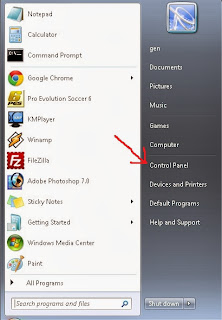
It's been a long time I don't post on my blog , I'll share simple tips to do After Installing Windows 7 . So many people don't care about their system and data safety. Now, I wanna share three important things to do after installing Windows 7. It's for your system and data safety. After Installing Windows 7 I always doing these things: #1 Make Sure Windows Update feature is active It's very important for security of operating system . Microsoft always patch every their product include Windows 7. To make sure it active or not, you can access Control Panel through Start Menu Click System and Security Click Windows Update Click Change Settings . It's recommended to select " Install Update Automatically ". Set to " Every day ". You can set the time as you wish. Before you work or after you work, or while you break. Click "OK" to apply settings. #2 Set Location of Documents to Logical Drive  I often seen so many PC...
How to Convert PDF to Word or Excel ?

I have write a tips for convert word to pdf before. At this time I want to share tips for convert pdf to word or excel. You can do this converting without software but just use free online converter. Try use http://www.freepdfconvert.com. With this you can convert ebook (pdf file) to word document or convert pdf to excel file (xls). Just do simple steps: click Choose file button to choose pdf file that you want to be converted. Then select output format. There are three options output format. You can choose word (doc) if you want to convert pdf to word, choose excel (xls) if you want to convert pdf to excel or you can choose output to RTF (Rich Text Format). You can also extract images from pdf file into png or jpg. After that just click button "Convert Your File". So your pdf file will be converted to output format that you've choosen.

How to Convert Word to PDF file?

There's my friend asked to me "How to convert word (*.doc) file to pdf file ?. I think there are many ways to do that. First you can use Adobe Acrobat to convert word to pdf (ebook). There are many ways without using software. You can convert word to pdf using free online service. For example http://www.wordtopdf.com/. Many people using that site for convert word to pdf for free. Just do simple steps. Choose word file and then click "Convert to PDF". So your PDF file can be created with easy steps.

SkyDrive Allows You to Access Your Files Anywhere

Image
I want to share about tips to access your files anywhere . Maybe you never heard Windows Live SkyDrive . Windows Live has a feature lets you to access your files or your documents anywhere with your PC, notebook or other gadgets. With SkyDrive you can backup your files with upload your files to cloud storage and then you can access and download your files anywhere. You don't need external drive, CD, DVR or flashdisk for save your files. If you want to try benefit of SkyDrive , you can go to skydrive.live.com . You must have a Windows Live ID to login. If you have not an account, you have to create an account there by click Sign up button. Now new SkyDrive app available for Windows Phone and iPhone so you can access your files with your Windows Phone or iPhone anywhere.

Free Online Storage for Data Backup

Image
Data existence is very important in the computer. Sometimes we think the data is more valuable than the computer hardware itself. Lost of important files or folders is very fatal. If you are an businessman with a lot of company administration data on your computer, then the data loss means destruction of the administration in your company. It can gives a negative impact for all aspects of the company. How if the financial file is missing or corrupt? This will result in the destruction of financial administration. So, how to solve the problem so that your data is always safe ? If you do not want to lost important data then you have to do scheduled backup . Eg you have to back up your important files and folders after perform your work on the file on the computer. Perform scheduled backups, such as daily or weekly. You can backup data on various media. Storage media for data backup such as CD, DVD, Bluray discs and hard disks . If possible, you can store data on online media. Many fr...